Smart Type 1 Diabetes Support

DiabeCare

Smart Diabetes Care for Safer Daily Decisions

DiabeCare is a smart mobile application designed to support people with Type 1 diabetes by connecting blood glucose tracking, meal logging, carbohydrate counting, insulin guidance, follow-up reminders, AI insights, and guardian support in one simple workflow.

Today Target

Last Blood Glucose

6.8 mmol/L

Before Lunch
3 Readings
2 Meals
Check Blood Sugar
Browse Meals

Project Summary

Abstract

Living with diabetes requires continuous daily decisions, including checking blood glucose, estimating carbohydrates, selecting meals, calculating insulin guidance, and remembering follow-up checks. These tasks can become difficult when users rely on memory, paper notes, or separate tools, and mistakes may affect daily safety and confidence.

DiabeCare addresses this problem by providing a smart mobile application that combines the main diabetes self-management activities into one connected workflow. The system supports blood glucose tracking, meal logging, carbohydrate calculation, insulin dose guidance, follow-up reminders, Low Rescue assistance, Daily Log, Weekly Overview, Guardian Mode, AI Insights, and administrative food management.

The application was developed using Flutter with Firebase and Supabase services to support secure authentication, cloud storage, real-time synchronization, and AI-based insight generation. It was evaluated through functional testing and questionnaire-based usability feedback, where users responded positively to screen clarity, design, and feature usefulness.

As an outcome, DiabeCare presents a safer, more organized, and more supportive diabetes management experience, especially for users who need structured guidance and caregiver monitoring.

About Project

About DiabeCare

Project Idea

DiabeCare was developed as a senior project to help users manage Type 1 diabetes more safely and clearly. The application focuses on daily diabetes decisions such as checking blood glucose, selecting meals, calculating carbohydrates, receiving insulin guidance, and reviewing previous records.

The Problem

Many people with Type 1 diabetes need to make several decisions every day, including monitoring blood glucose, estimating carbohydrates, calculating insulin doses, and remembering follow-up checks. These tasks can become stressful, especially for children and users who need guardian support.

Project Objectives

Clear Goals of DiabeCare

The project focuses on measurable goals that improve daily diabetes management and user support.

01

Unify daily tracking

Combine glucose readings, meals, carbohydrates, reminders, and logs in one mobile workflow.

02

Support insulin guidance

Use personal ratios and target glucose values to provide structured meal and correction guidance.

03

Improve meal decisions

Help users calculate carbohydrates from food library items, portions, and food scale entries.

04

Enable guardian monitoring

Allow caregivers to follow readings, receive updates, and support children or supervised users.

05

Provide smart insights

Analyze glucose, meals, notes, and dose history to generate useful AI-based summaries.

06

Increase safety and clarity

Use reminders, Low Rescue support, validation, and clear screens to reduce missed actions.

Core Features

Main Features

🩸

Blood Glucose Tracking

Record and monitor blood glucose readings with clear status labels.

🍽️

Meal & Carb Counting

Select meals, calculate carbohydrates, and review meal details before making a decision.

💉

Insulin Guidance

Provide structured insulin guidance based on meal information and user settings.

📘

Daily Log

View previous readings, meals, notes, and decisions in one organized place.

📊

Weekly Overview

Review weekly glucose records using a simple table view.

🛡️

Guardian Mode

Allow a guardian to follow and support the user through connected monitoring.

🤖

AI Insights

Use smart analysis to help users understand patterns and improve future decisions.

Workflow

How DiabeCare Works

1

Check Blood Glucose

The user records a blood glucose reading before the meal.

2

Select Meal

The user selects food items or enters custom meal information.

3

Review Guidance

The app calculates carbohydrates and provides insulin guidance.

4

Follow Up

The app reminds the user to check blood glucose after the meal.

Methodology / Approach

How the System Was Built

A simple overview of the architecture, tools, development approach, and data used in the project.
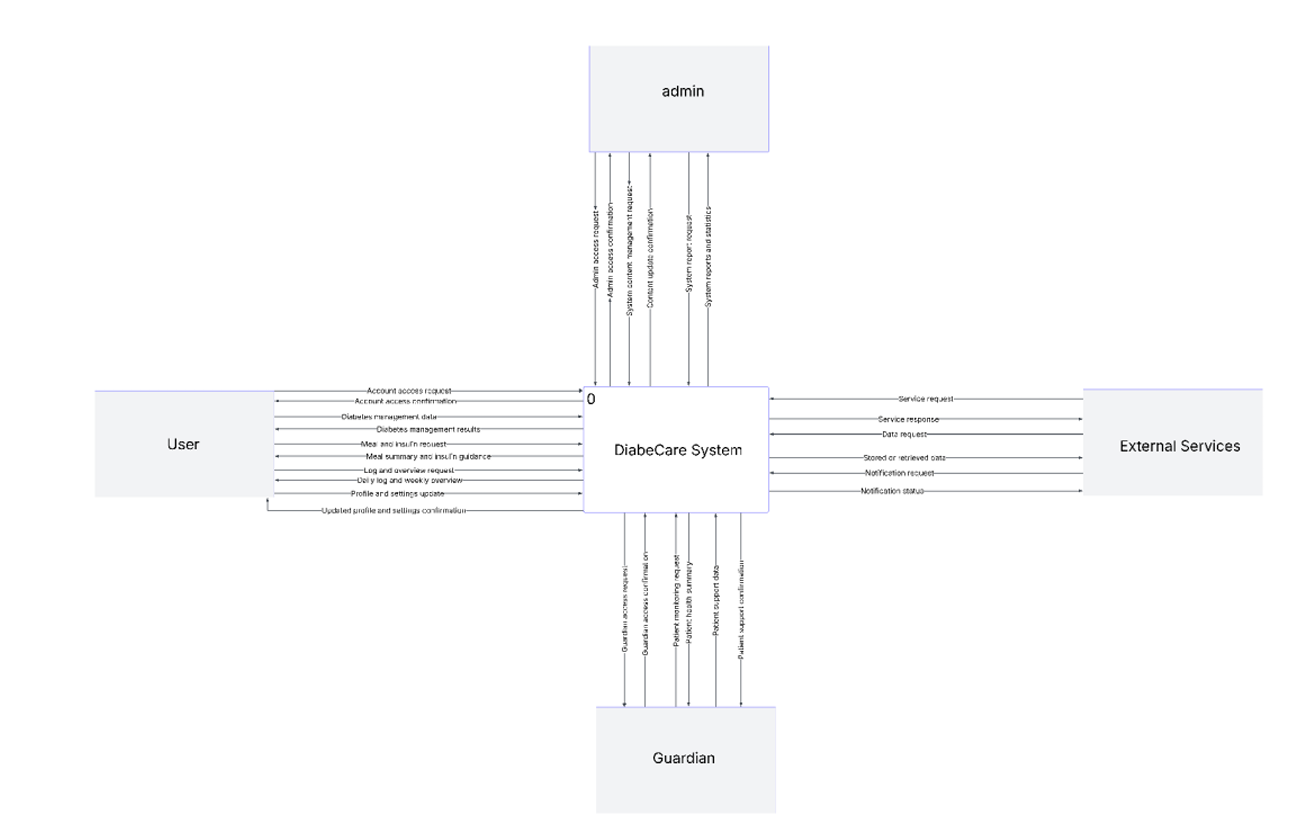
DFD Level 0 diagram for DiabeCare
System Context

DFD Level 0

High-level overview showing how users, guardians, admins, and external services interact with the DiabeCare system.
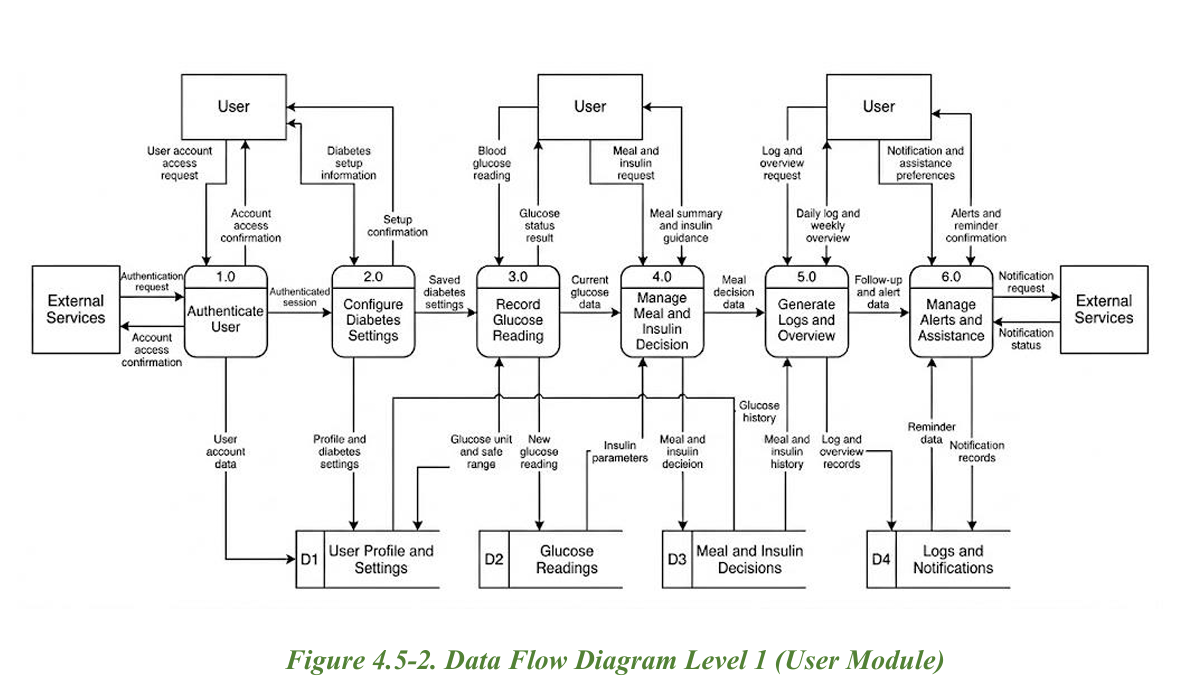
DFD Level 1 User Module diagram for DiabeCare
User Workflow

DFD Level 1 — User Module

Detailed user-side workflow for authentication, diabetes setup, glucose readings, meal decisions, logs, and alerts.
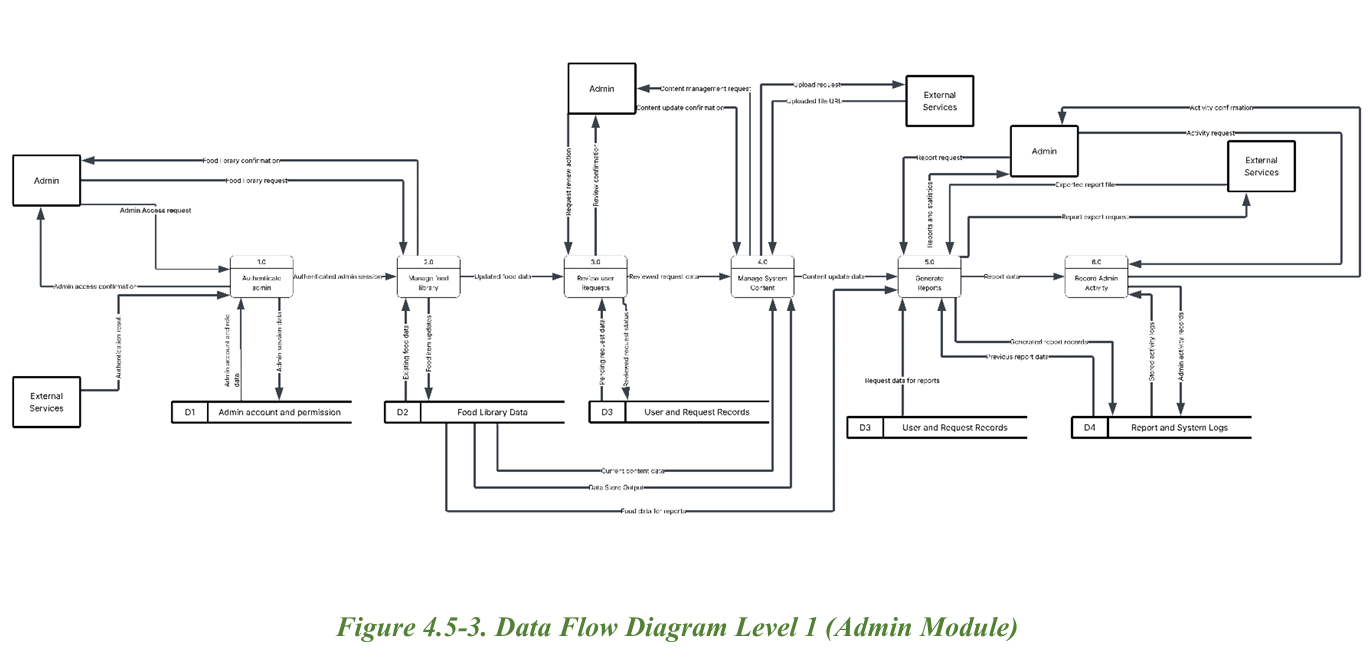
DFD Level 1 Admin Module diagram for DiabeCare
Admin Workflow

DFD Level 1 — Admin Module

Administrative flow for managing food content, reviewing requests, generating reports, and recording system activity.

Development approach

Iterative development was used: requirements were collected, UI flows were designed, core features were implemented, then functional and usability testing were applied.

Tools & frameworks

Flutter was used for the mobile interface, Firebase for authentication and real-time data, Supabase for AI services, and HTML/CSS/JavaScript for this website.

Data and hardware

The system uses user-entered glucose readings, meals, carbohydrates, insulin parameters, notes, and guardian updates. No special hardware is required for the current version.
Technologies Used

Technology Stack by Category

The project combines mobile development, cloud services, AI support, and web technologies.

Programming

Dart, HTML, CSS, JavaScript

Used for the Flutter application logic and the public project website.

Framework

Flutter

Used to build the cross-platform mobile interface and application workflow.

Cloud & Database

Firebase, Firestore, Storage

Used for authentication, data storage, file storage, and real-time synchronization.

AI

Supabase AI Service

Used to support AI Insights and generate smart summaries from user history.

Local Storage

SharedPreferences

Used for selected local settings and lightweight app preferences.

Tools

VS Code, GitHub, Android Tools

Used for development, version control, testing, and deployment preparation.

Results & Evaluation

Visual Evidence and Testing Outcomes

The project was evaluated through functional testing, questionnaire feedback, and completed feature demonstrations.

52Survey responses

User feedback supported requirement collection and evaluation.

67.3%Memory-based tracking

Many participants still rely on memory, showing the need for organized tracking.

65.4%Meter history usage

Users commonly review meter history, which DiabeCare organizes into logs.

42.3%Mobile app usage

There is room for a more complete connected diabetes application.

Testing coverage

  • Account creation and setup process
  • Blood glucose recording
  • Meal selection and carbohydrate calculation
  • Insulin guidance and follow-up reminder
  • Daily and weekly data review
  • Guardian Mode and AI Insights screens

Evaluation outcome

The usability evaluation showed positive responses regarding design clarity, feature usefulness, and the overall ability of DiabeCare to organize daily diabetes management.

Screen clarity
Feature usefulness
Workflow completeness

App Interface

App Screens

Explore the main DiabeCare interfaces using the screen tabs and page buttons below.

Splash page preview
Selected Interface

Splash

The first loading screen that introduces the DiabeCare brand.

Project Pitch

Elevator Pitch

A short bilingual presentation introducing DiabeCare, its problem, solution, and impact.

Bilingual Pitch

DiabeCare in under two minutes

Watch the English and Arabic elevator pitch videos to understand how DiabeCare supports safer daily diabetes decisions through tracking, guidance, reminders, AI insights, and guardian support.

Problem Solution Impact
English Version EN

Short English pitch explaining the project idea, features, and value.

Arabic Version AR

Short Arabic pitch presenting DiabeCare clearly for local audiences.

Project Closing

Conclusion & Future Work

A short summary of the project outcome and the next improvements planned for DiabeCare.

Conclusion

A safer connected workflow

DiabeCare provides a connected and user-friendly solution that helps people with Type 1 diabetes manage daily decisions more safely and efficiently.

By combining glucose tracking, carbohydrate counting, insulin guidance, reminders, AI insights, and guardian support into one workflow, the project improves organization, accessibility, and user confidence.

Future Work

Scalability opportunities

  • 01 Advanced AI Predictions
  • 02 Personalized Recommendations
  • 03 Voice-Based AI Assistant
  • 04 Smartwatch & CGM Integration
  • 05 Automatic Emergency Alerts
  • 06 Expanded Food Database
  • 07 Multi-language Support

About the Project & Team

Project Team

Student and supervisor information for the DiabeCare senior project.

This project is a Final Year Senior Project completed during Semester 2 of the Academic Year 2025/2026 at the College of Information Technology — University of Bahrain.

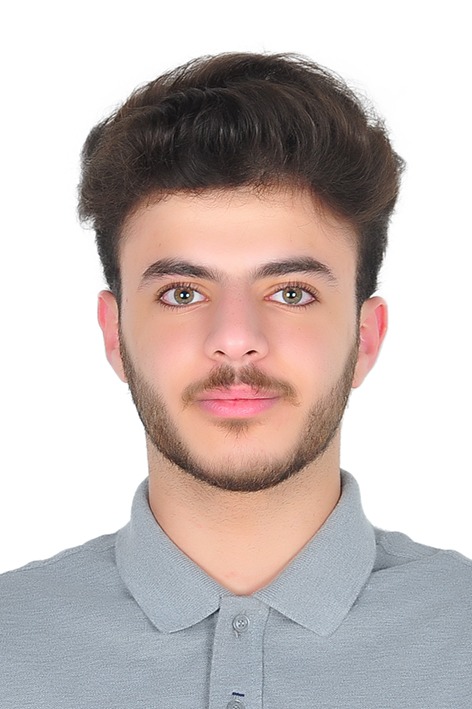
Ali Jaafar Khalaf

Ali Jaafar Khalaf

Information Systems

202106454@stu.uob.edu.bh

+973 35489511
Ammar Ali Matrook

Ammar Ali Matrook

Information Systems

202103604@stu.uob.edu.bh

+973 66767252
Mohamed Ahmed Alaali

Mohamed Ahmed Alaali

Information Systems

202106535@stu.uob.edu.bh

+973 36443231
Dr. YAQOOB SALMAN MOHAMED ALSLAIS

Dr. YAQOOB SALMAN MOHAMED ALSLAIS

Project Supervisor Assistant Professor

ysalslais@uob.edu.bh

Contact Us

For project inquiries, feedback, or collaboration, contact the DiabeCare team through the official project email.

info@diabecare.life